
iStreamTunes13.1 - App Store
You'll be able to see results in few seconds.
Publisher Description
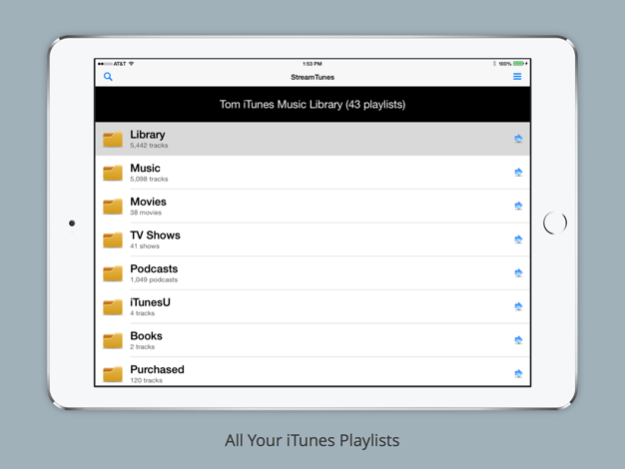

Stream your iTunes Library from anywhere.
Any playlist, any song or any videos.
Also can add other photos, documents, web documents to make available.
Stream your iTunes Music library to your iPhone or iPad from Windows over WiFi and 4G! Stream audio, video, music, documents and photo files from anywhere using your iPad, iPhone or iPod Touch. What's New? Shuffle, search filters, continuous play and advanced caching of songs and artwork. New easy server configuration for opening ports. Come with free iStreamTunes for iTunes server software for Windows.
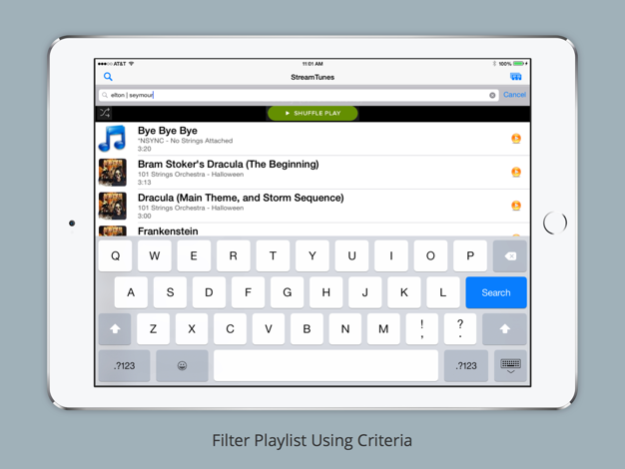
Use shuffle mode to randomly playing through a playlist. Can also shake the device to do a shuffle. Shaking the device while the main playlists are displayed will select your Music Playlist and do a Shuffle.
Search now does a filter showing only matching result. You can use logical OR or AND for two criteria. e.g. Coldplay | AC/DC , e.g. Underwood & Lambert
Normal playing mode will automatically play through an entire playlist unless you turn the Setting off.
REQUIREMENT
Works only with PC running FREE Media Server software provided.
The app interfaces with the iStreamTunes Media Server which runs on your PC. Included with this purchase is a free licensed copy of the iStreamTunes Media Server for your PC. When StreamTunes app for the first time, you are provided with the necessary details for downloading and installing the StreamTunes Media Server. After the server is installed, use the registration email and password in the app settings so that the app can connect to your media server.
KEY FEATURES
• Full iTunes library integration; browse ALL your iTunes playlists and tracks
• Easy setup
• Works over WiFi and 4G so can access from anywhere using home, business WiFi or 4G cell Internet.
• Access using app or any web browser (Web Client).
• Shuffle play for all playlists.
• Continuous, single and random playlist modes
• Play full playlist or single tracks
• Album artwork
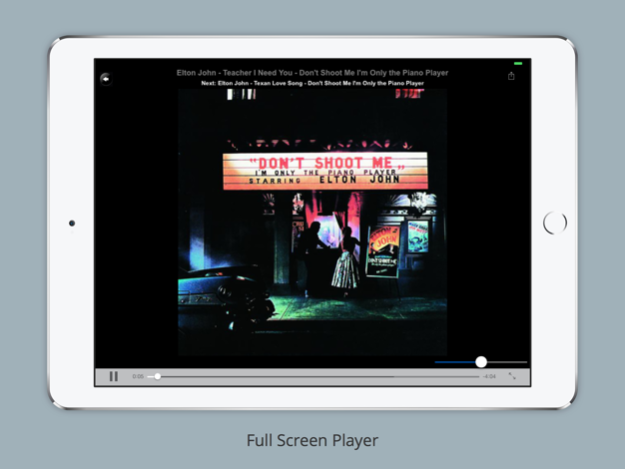
• Background audio player or full screen audio player with artwork
• Full screen video player supporting HTTP Live Streaming (HLS)
• AirPlay audio and video support (video requires iPad, iPhone or iPod Touch running iOS 7.0 or greater)
• StreamTunes Server Monitor
SPECIAL FOLDERS
• My Pictures special folder for serving your pictures
• My Documents special folder for service your Word, Excel, PDF, text format files and much, much more
• My Web Documents for serving up Internet web pages.
• My Other for including dynamically file types such as videos. A list of My Other files is presented using your mobile browser so access to these files can be provided.
NO NEED TO CONVERT OR SYNC
Why bother converting your stuff to an iPad, iPhone or iPod Touch format before you can view it? Syncing files to your iOS device is a pain.
IMPORTANT INFORMATION
iStreamTunes companion program iStreamTunes Media Server, which runs on your PC, does that for you. iStreamTunes users can download iStreamTunes Media Server for free from https://www.streamtunes.tv/mobile/. The app, will when first starting, display details on acquiring the FREE companion StreamTunes Media Server.
Can use alternative browser web client on Mac, Linux or other clients by going to https://www.streamtunes.tv and logging in from anywhere.
iStreamTunes converts the files to an iPad, iPhone or iPod Touch friendly format on-the-fly, whether on WiFi or 4G so a single touch will start playback on your device in as little as 5 seconds.
UP TO HD VIDEO QUALITY
You can stream movies up to HD quality (720p) over WiFi to your iPad , iPhone or iPod Touch from most recent PCs.
WiFi or 4G Network Connection
Stream over 4G anywhere from your PC to your iPad, iPhone or iPod Touch. You can watch your movies, listen to your music wherever you are. Registration information can be changed at any time and is set in the iStreamTunes app settings.
Connecting through the Internet using 4G requires port forwarding on your router to open access. This is automatically configured for you by the iStreamTunes Media Server when it starts running.
Mar 18, 2019
Version 13.1
Fixed bugs.
About iStreamTunes
The company that develops iStreamTunes is MarkelSoft, Inc.. The latest version released by its developer is 13.1.
To install iStreamTunes on your iOS device, just click the green Continue To App button above to start the installation process. The app is listed on our website since 2019-03-18 and was downloaded 0 times. We have already checked if the download link is safe, however for your own protection we recommend that you scan the downloaded app with your antivirus. Your antivirus may detect the iStreamTunes as malware if the download link is broken.
How to install iStreamTunes on your iOS device:
- Click on the Continue To App button on our website. This will redirect you to the App Store.
- Once the iStreamTunes is shown in the iTunes listing of your iOS device, you can start its download and installation. Tap on the GET button to the right of the app to start downloading it.
- If you are not logged-in the iOS appstore app, you'll be prompted for your your Apple ID and/or password.
- After iStreamTunes is downloaded, you'll see an INSTALL button to the right. Tap on it to start the actual installation of the iOS app.
- Once installation is finished you can tap on the OPEN button to start it. Its icon will also be added to your device home screen.
Program Details
System requirements
Download information
Pricing
Version History
version 13.1
posted on 2019-03-18
Mar 18, 2019
Version 13.1
Fixed bugs.
Disclaimer
Official App Store Link
We do not host iStreamTunes on our servers. We did not scan it for viruses, adware, spyware or other type of malware. This app is hosted by Apple and passed their terms and conditions to be listed there. We recommend caution when installing it.
The App Store link for iStreamTunes is provided to you by apps112.com without any warranties, representations or guarantees of any kind, so access it at your own risk.
If you have questions regarding this particular app contact the publisher directly. For questions about the functionalities of apps112.com contact us.
